ChatGPT Ads Have Landed in the UK: What Advertisers Need to Know

Last updated: 29 September 2026
More of your customers are starting their buying journey by asking an AI. Not typing three words into a search box and scanning ten blue links, but actually asking ChatGPT "what's the best cordless drill for a small workshop under £150?" and reading the answer it writes back. That shift has been building for two years — and if you want the fuller picture of how fast it is moving, we wrote about that in AI is reshaping digital marketing right now. What's new is that there is now a paid way into it.
On 6 June 2026, OpenAI switched on advertising inside ChatGPT in the UK — the first market in Europe to get it, following the original US test in February. UK businesses could open their own self-serve Ads Manager accounts from 19 June, and since late August ChatGPT ads have spread to 31 more European countries. If you sell online, there is now a way to appear inside the conversation itself, at the exact moment someone is asking for a recommendation.
Here's the trap. It looks like search, so the instinct is to run it like Google. It isn't Google, and treating it that way is the fastest route to a wasted budget. Get the difference right, though, and you are early to a channel most of your competitors haven't even opened.
We've put our money where our mouth is on this: Coffee Marketing Digital has opened its own OpenAI Ads account, and our first paid campaign went live on 25 September 2026. Everything below is written from inside the account, not from a press release. It is still an early, fast-moving beta — so treat this as a living guide. We've added what our first week of spend has shown us (further down), and we'll keep expanding this article as the results build.
ChatGPT ads, in plain English
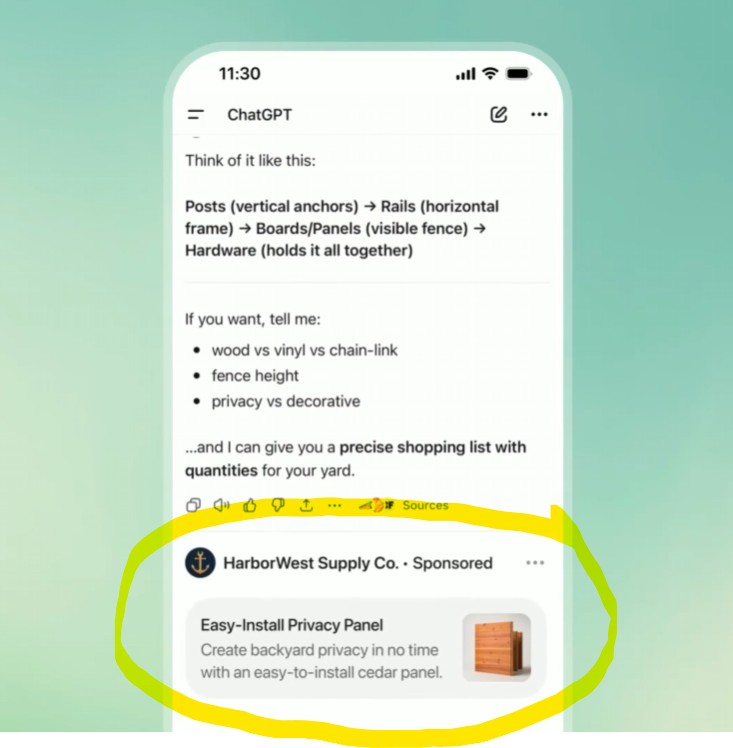
When a Free or Go user asks ChatGPT something with commercial intent, a single clearly-labelled Sponsored unit can appear below the answer — advertiser name, a title, a line of copy, an image and a link. For shopping queries, that can become a product card or a small carousel showing price and reviews. It sits apart from the answer and is always labelled. Crucially, the ad appears inside the conversation itself — rendered inline, directly beneath ChatGPT's reply, not on a separate search-results page.
Two things surprise people:
- Only Free and Go users see ads. Anyone on Plus, Pro, Business, Enterprise or Edu gets an ad-free experience. So the audience you're buying is the free tier, not the heavy paying users. Free users can also opt out into an ads-free version with lower usage limits, while people using ChatGPT logged out can still see ads.
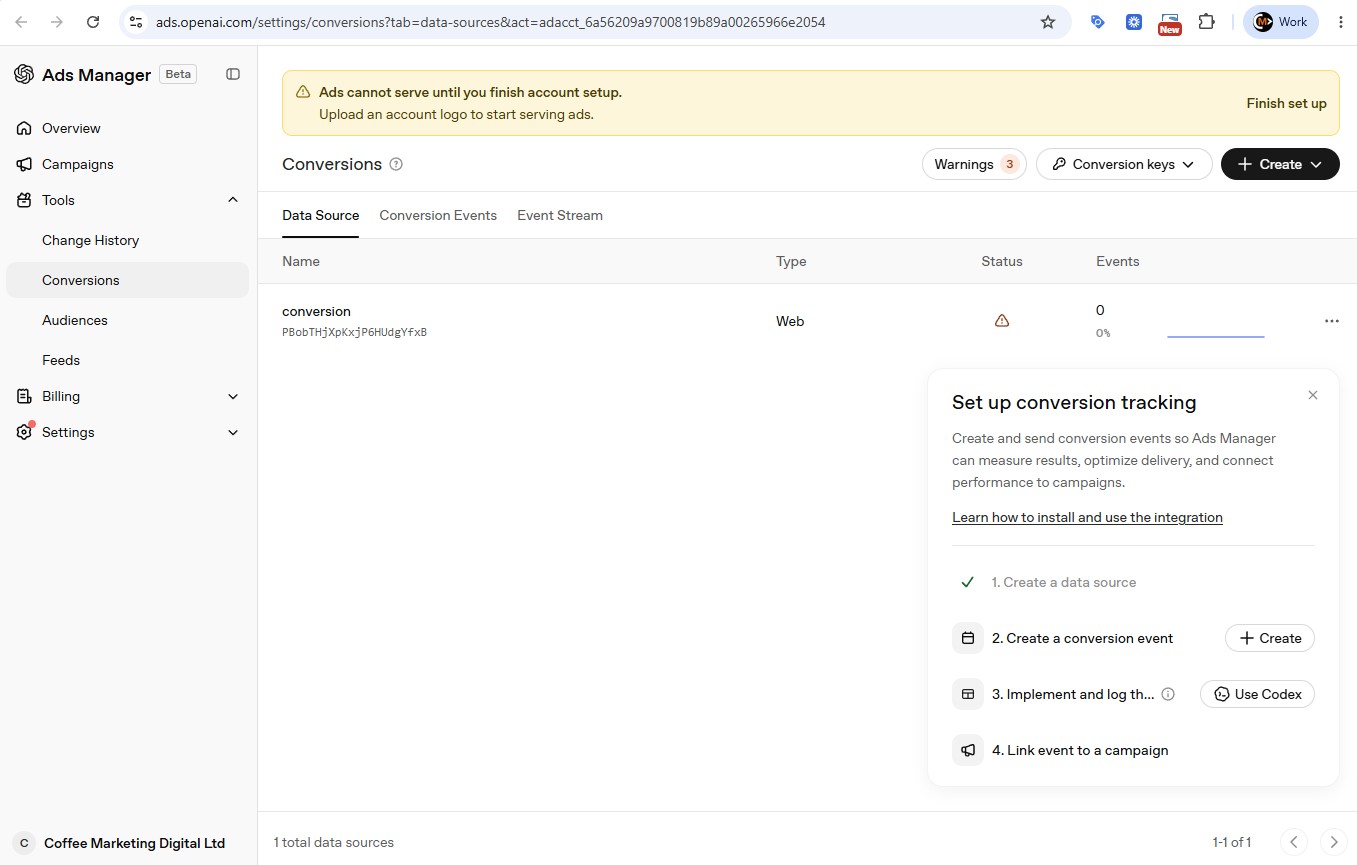
- It's still a beta. The platform is literally badged "Ads Manager Beta", and until you finish account setup and business verification, nothing serves at all.
It's live in the UK — but it's early
UK users started seeing ads on 6 June 2026, and UK businesses got self-serve access on 19 June. From inside our own account, three things are worth knowing before you plan anything:
- You bill in pounds. Our account is a UK limited company and budgets are denominated in £ GBP in the interface, not dollars. Get the country, currency and time zone right at sign-up — OpenAI says none of the three can be changed after the account is created.
- You can set UK-only targeting — but check where conversions come from. "Locations for this campaign" is a first-class setting: set it to United Kingdom, and there's a matching exclusion list where exclusions win. One caution from our own campaign: our UK-only test's first sign-up was located in Cameroon by Google Analytics. We haven't established why — a VPN or how the visitor's IP address was located are both possible — so check where your conversions actually come from rather than assuming the setting is the whole story. Standard campaigns can now go finer, to regions, cities and postcodes where available, and you can choose platforms (iOS and Android app, iOS and Android web, desktop web). Product feed campaigns are country-level only.
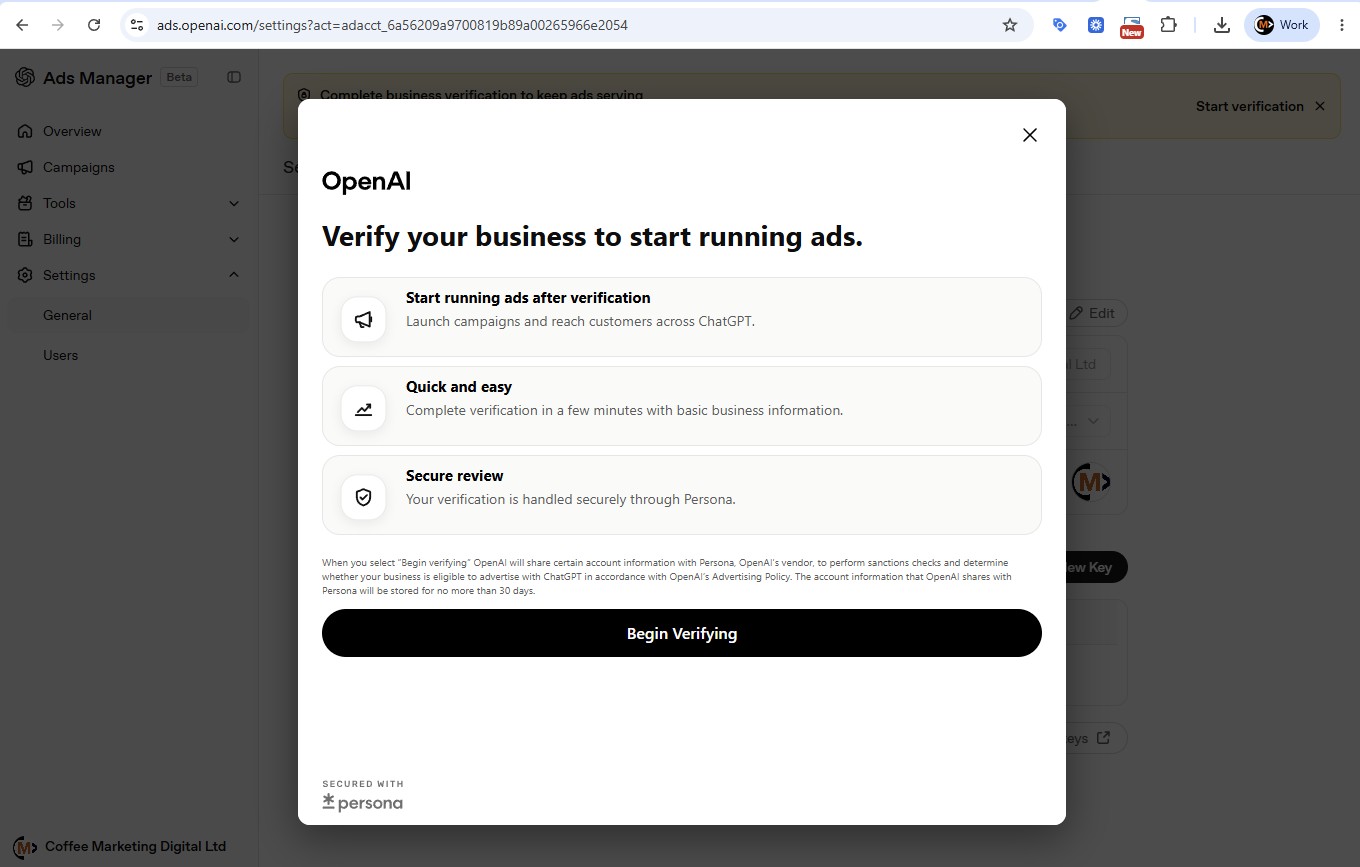
- You must verify your business first. When we set ours up, verification ran through Persona (OpenAI's identity vendor) and covered sanctions and eligibility checks. We submitted ours and it went straight into review — OpenAI said this takes a few days. Billing must also be set up before anything delivers. No verification, no serving.
The big difference: you can't buy a keyword
This is the part that catches every experienced advertiser, and it's the single most important thing to understand.
On Google, you bid on the words a customer types. You choose keywords, you choose match types, and you control, to the letter, which queries you're willing to pay for. On ChatGPT there are no keywords to buy. Instead you write context hints — plain-English descriptions of the conversations and topics where your product belongs — and the model decides when you're genuinely relevant to what someone is discussing. There is no guaranteed delivery and no exact-match precision. You're buying contextual relevance, not query control. OpenAI's own guidance, updated in September, is to write each hint as a clear, natural phrase about one idea — not a list of disconnected keywords.
Pricing works on a relevance-weighted second-price auction (you pay just above the next competing bid, adjusted for how relevant the system thinks you are). You choose one of three objectives: Views (CPM, cost per thousand impressions), Clicks (CPC, cost per click) or Conversions, which optimises towards a conversion event you track but still bills per click or per thousand impressions — you never pay per conversion. OpenAI suggests a starting maximum CPC of $3–$5; it publishes that guidance in US dollars only, with no sterling figure. In our own first campaign, bidding a £4 maximum, we paid between £2.70 and £3.74 a click across our ad groups.
On Google you buy the words a customer types. On ChatGPT you describe the conversations you want to be part of, and the model decides. That one difference breaks twenty years of keyword habits.
How it compares to Google, Microsoft and Meta
| ChatGPT Ads | Google Search Ads | Microsoft Advertising | Meta Advantage+ | |
|---|---|---|---|---|
| How you target | Context hints — describe the conversation | Keywords — match the query | Keywords — match the query, plus LinkedIn profile bid adjustments | Interests + AI signals |
| Buying model | CPM, CPC or conversion-optimised; second-price auction | CPC, second-price auction | CPC auction — you set a maximum bid | CPM / optimised CPM |
| Starting bid guidance | $3–$5 max CPC (published in USD only) | Keyword-dependent | Keyword-dependent (first-page bid estimates) | Auction-set |
| Who you reach | Free & Go ChatGPT users | Everyone searching Google | Bing, Yahoo, AOL, DuckDuckGo, Ecosia — and Copilot answers | Facebook & Instagram users |
| Creative | Sponsored unit / product card or carousel with price | Text ad / Shopping listing | Text ad / Shopping listing; Copilot formats built from your assets | Image / video / carousel |
| Advertiser control | Low — the model judges relevance | High — keyword + match type | High — keyword + match type (but no opt-out from Copilot) | Low–medium |
| Maturity | Beta (2026) | 20+ years | Since 2006 (launched as adCenter) | Mature |
The honest summary: this is closer to the contextual buying of early Meta than to the intent buying of Google Search. You give up precision and hand relevance decisions to the model. In exchange you reach people at a genuinely new moment — mid-conversation, mid-decision.

As consumers increasingly turn to AI for searching for products and recommendations, AI generated product results will dramatically increase and eventually supersede the old means of advertising products online. OpenAI's ChatGPT is the first into the ads market with paid-for placements with a more trusted and personable means to suggest your products to relevant audiences, so it made sense for us to test it on ourselves first.
Alistair Williams, Coffee Marketing Digital
Setting it up: what the account actually looks like
The campaign builder is refreshingly simple. You name the campaign, pick an objective (Views, Clicks or Conversions), set your location to the United Kingdom, and set a daily or campaign-total budget in pounds. One thing to note: when we set up our campaigns, the budget type could not simply be swapped once chosen — you could change the amount, not the type — so pick it deliberately.
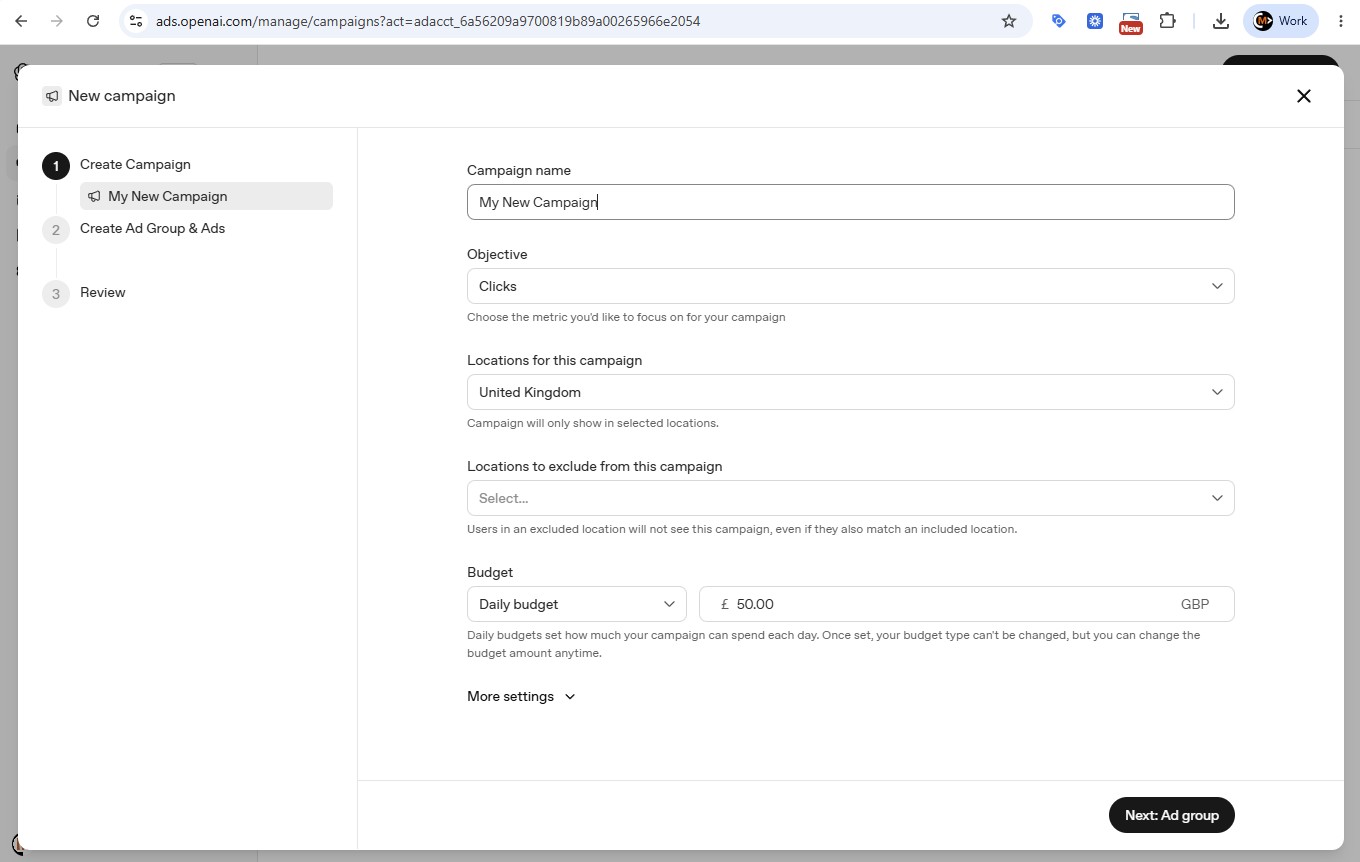
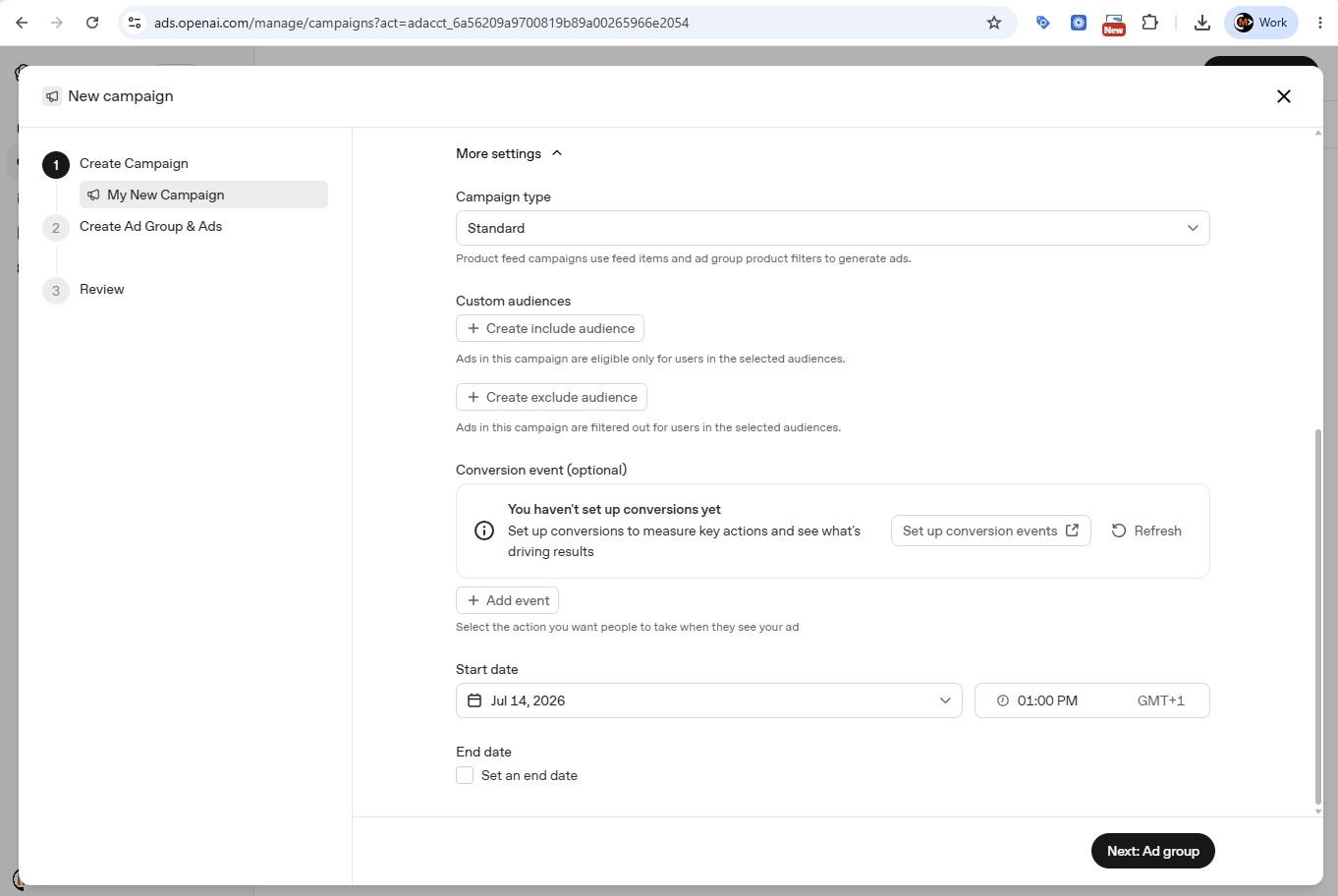
Under "More settings" you'll find the pieces that matter for eCommerce. Campaign type is either Standard or Product feed — feed campaigns generate ads from your product feed and ad-group filters, which is how the shopping-style cards get built. You can also attach custom audiences and link a conversion event.
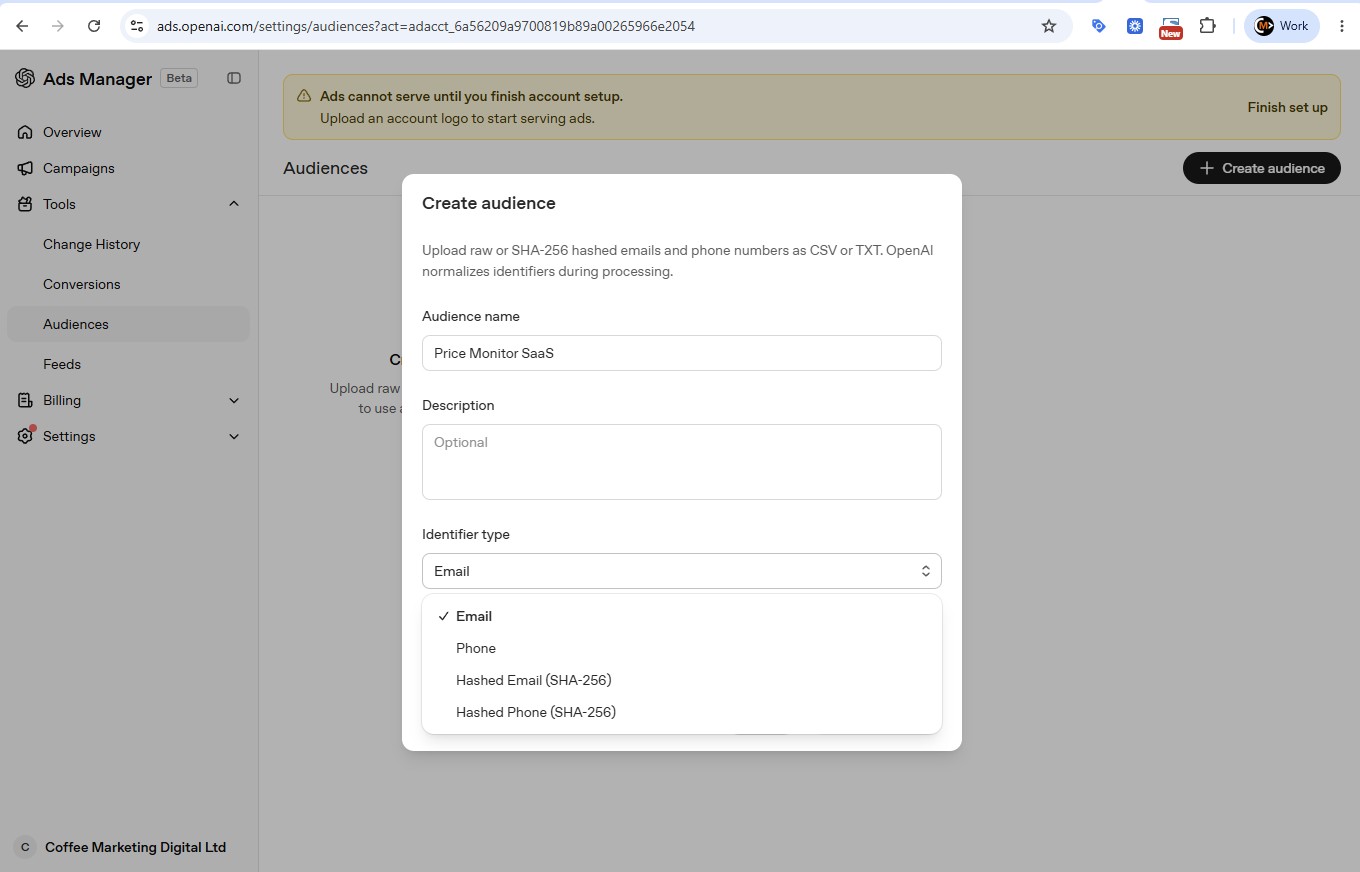
Those custom audiences are more powerful than they first appear. You can upload your own email or phone lists — raw, or SHA-256 hashed — and either include or exclude them. That means you can suppress existing customers from an acquisition campaign, or raise your bids (from 0.1× to 10×) for people on a list of your best buyers. There's a size hurdle: including an audience, or bidding on it, needs at least 25,000 matched users — matched, not uploaded — while exclusion lists can be any size. One caution for UK advertisers: you need a lawful GDPR basis before you upload anyone's data, so treat this exactly as carefully as you'd treat a Customer Match list on Google.
Measure it on profit, not the platform's word
Here is where our profit-first discipline matters more than anywhere else. Because there are no keywords, no published benchmarks, and the platform only knows what a sale was worth if you tell it, you cannot judge this channel on its own dashboard. You have to measure it yourself — the same principle we set out in Beyond ROAS: a spend vs efficiency framework.
The setup is straightforward. Create a data source (a pixel), create a conversion event mapped to a real action, install the pixel and the server-side Conversions API, and link the event to your campaign. The attribution window is configurable: the click window can be 7, 14 or 30 days (30 is the default), and a separate view-through window is 0 or 1 day (1 is the default). If you want click-only numbers, set the view window to 0 when you report. Add static UTM tags to every landing URL so ChatGPT traffic shows up in your own analytics independently of OpenAI's numbers.
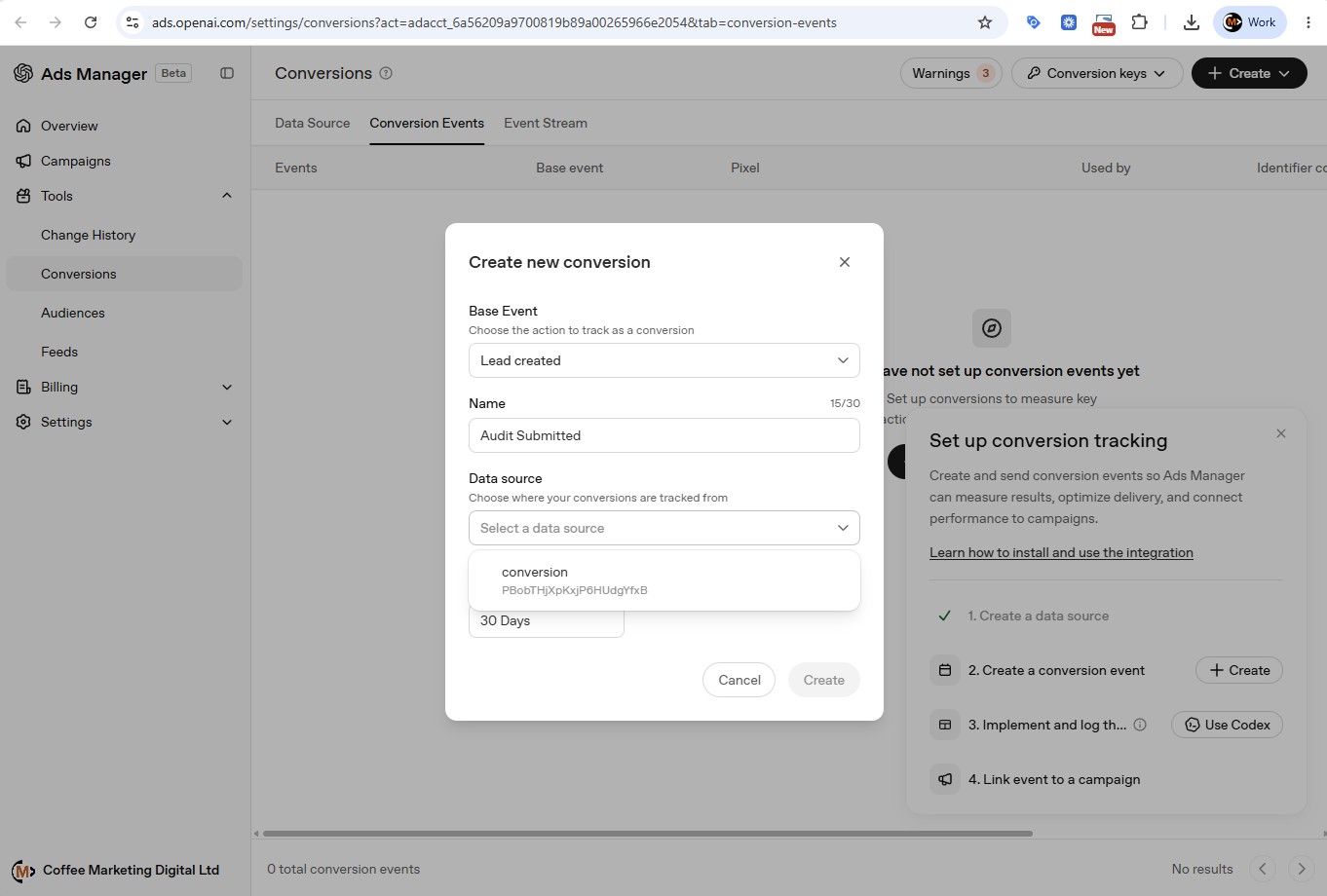
The single most important move: feed profit as your conversion value, not revenue. A £100 order with a 40% margin and £10 shipping is worth £30 to you, not £100 — so pass 30. OpenAI's reporting now shows attributed sales and a ROAS figure built from the value you send with purchase events, so if you pass profit, those columns report profit, not revenue — label them that way. Then judge the whole channel on Cost of Sale (CoS) — ad spend as a percentage of the sales it generates — because CoS is the number that actually protects your margin.
An illustrative example (there are no reliable ChatGPT benchmarks yet, so these figures are for shape, not prediction):
| Illustrative UK test | |
|---|---|
| Budget | £1,500 |
| Average CPC | £2.80 |
| Clicks | ~535 |
| Conversion rate | 3% |
| Orders | ~16 |
| Average order value | £250 |
| Revenue | £4,000 |
| Cost of Sale | 37.5% |
If your target CoS is 30%, that test is over target on the face of it — but if those are new customers with strong repeat value, the lifetime picture may still stack up. The point isn't the numbers; it's the method. Set your target CoS first, feed the pixel profit, and let the test reach a fair sample before you judge it.
The nuances that will catch you out
- You're buying the free tier. Your reach is Free and Go users, not the heavier paying users.
- No agency "manager account" yet. There's no Google Ads MCC equivalent by default — OpenAI's instruction is a separate ad account per advertiser (one login can switch between them), each API key is tied to a single ad account, and partner-level access means talking to OpenAI directly.
- Restricted categories. No ads adjacent to personal health, mental health or politics; no political ads; nothing served to under-18s. In this early phase OpenAI is focused on consumer categories — household and consumer goods, local services, travel and experiences, digital products and education — and outside the US, ads for financial, health and legal services are generally prohibited.
- New formats land in the US first. Sponsored Agents, announced on 16 September 2026, open a conversation with the advertiser's own AI agent when someone clicks — but it's a test with select US advertisers, not something UK accounts can buy.
- Genuine unknowns remain. VAT treatment on the first invoice, any minimum spend, and real CPC/CPM benchmarks for eCommerce are all still open questions — which is exactly why we're testing before we recommend budgets.
- You only get aggregated data. Advertisers never see individual chats — only anonymised, aggregated performance.
What our first campaign has shown so far
We promised to come back with what we learn from our own spend, so here is the first instalment. One caveat up front: our test is a lead-generation campaign — a free guide for UK marketplace sellers — not an eCommerce sales campaign, and four days of data is a first look, not a verdict.
- The set-up: a £500 campaign-total budget over 28 days from 25 September 2026, the Clicks objective, UK only, six ad groups, 22 ads and a £4 maximum CPC.
- Review was painless. All 22 ads were approved at their first review.
- First four days: 5,548 impressions, 29 clicks and £82.41 spent — a 0.52% click-through rate and a £14.85 CPM. We paid £2.70–£3.74 per click across the ad groups, so the £4 bid was enough to win delivery.
- One sign-up so far. OpenAI's conversion tracking, Google Analytics and our own lead database all agree on it. One lead is not a cost-per-lead, so we're not quoting one.
- Your analytics will not match the platform. OpenAI counted 29 clicks; Google Analytics recorded one landing from them. Part of the gap is that our cookie banner defaults analytics to off, so GA4 only sees visitors who accept cookies — we haven't yet confirmed where the rest went. Plan to reconcile ChatGPT traffic against your own server-side order or lead records, not GA4 alone.
We'll update this section with the full 28-day readout, including cost per lead once there's a fair sample behind it.
What to do this week
You don't need to spend a penny to get ready. This week: open a free OpenAI Ads Manager account at ads.openai.com, complete business verification (it takes a few days, so start now), and get the conversion pixel firing on your site with profit as the value. Do that and the day you decide to test, your measurement is already in place — and you'll never judge the channel on a number that doesn't include your margin.
If you'd rather someone ran that test properly — with the tracking wired to profit and the results read against your real Cost of Sale — that's exactly what we're building for our own clients right now. Let's have a conversation about whether ChatGPT ads are worth your budget yet.